Kubernetes Networking Clicked When I Stopped Starting With Kubernetes
A from-first-principles walkthrough of Linux networking, namespaces, veth pairs, bridges, Docker networking, and how those ideas map to Kubernetes CNI.
I’m an Infra Engineer… and I Still Struggle With Networking
Back during the third year of Computer Science studies, students had to decide which major they wanted to pursue. The options were:
- Software Engineering
- Networking
- Artificial Intelligence
In 2026, the decision probably feels obvious 😄
I don’t think my university publishes any data, but I would bet money that way more people choose AI today than they did eight years ago when I was doing my degree.
Back then, most people (including me) leaned toward Software Engineering rather than Networking. There was this weird, ominous feeling around Networking and people treated it as “boring infrastructure stuff” and assumed there wouldn’t be many jobs in it later.
It is funny looking back now and realizing where I ended up. Honestly, I would probably choose Networking in a heartbeat today 🙈
Anyway… this long introduction is basically me trying to say:
Hey, I’m Shadi. I’m an infra engineer, and guess what kind of infra I work on? Transport infrastructure (also known as Traffic infrastructure in many companies).
You would assume that means I’m good at Networking. Welp… I’m not 🤷🏻♂️
I’ve always considered myself a software engineer who happened to fall in love with infrastructure. Over the last four years, that passion has mostly revolved around networking and service mesh technologies, which was absolutely not part of the original plan.
But honestly? I still struggle with everything below Layer 4 of the OSI model. However, I work with a lot of brilliant people who help me whenever I get lost, but I’m also a nerd by definition and always want to understand how things actually work.
So in this blog, I want to understand Linux networking from first principles:
- How packets move around
- How interfaces and routing work
- How namespaces behave
- How containers connect to networks
- and eventually how all of this maps to Kubernetes
I’m also pretty sure there are people far more qualified than me to teach you networking, but maybe that’s actually useful.
This isn’t a networking expert teaching networking, instead it is just me trying to slowly de-mystify networking in public.
Let There Be Light…
Before we dive into the darkness of Linux networking, let’s first talk about the simplest possible case:
How can two devices talk to each other?
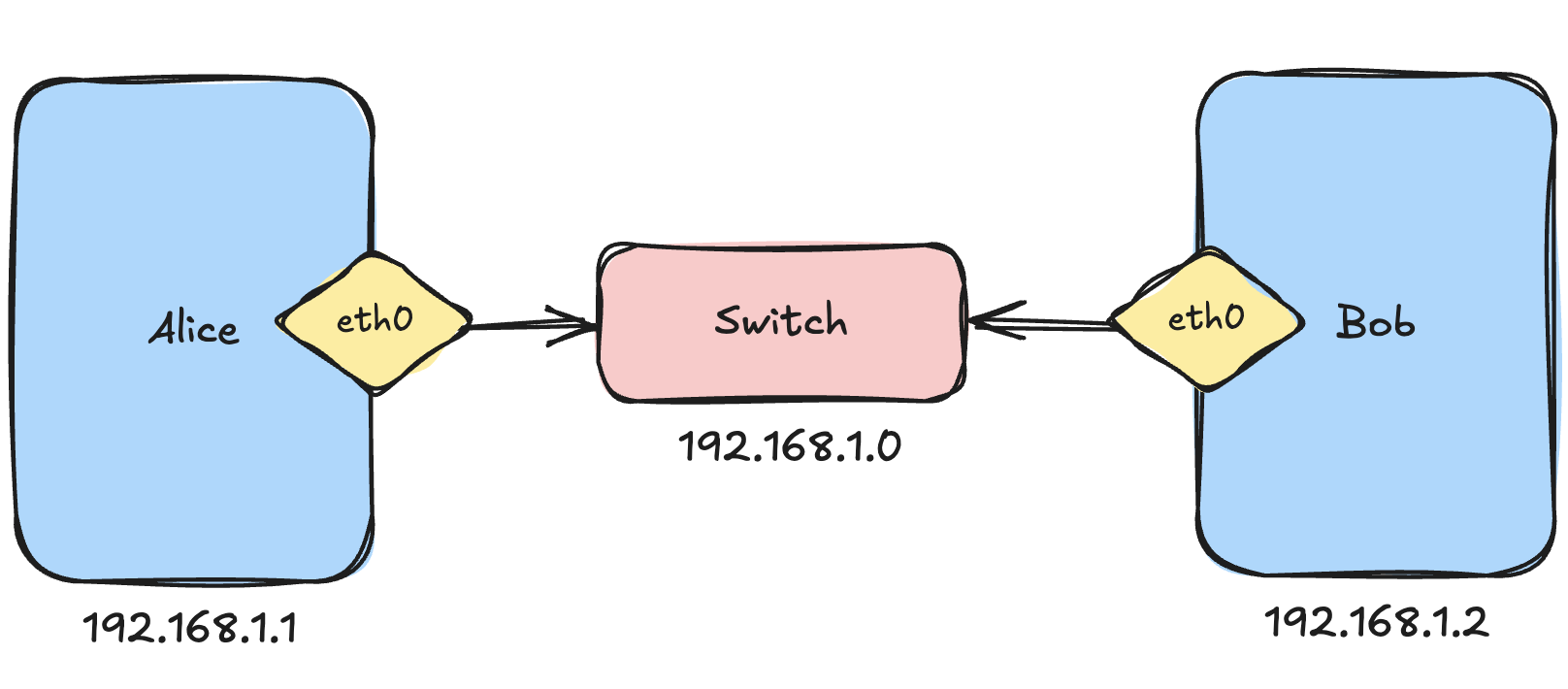
Imagine our old university friends: Alice and Bob and both want to ping each other.
To allow two devices to communicate, we can connect them to a switch. A switch acts like a bridge between machines.
But here’s something that turned out to be surprisingly important later: Devices communicate through their network interfaces. You can think of a network interface as a mailbox on a machine. It is where bytes enter and leave the system.
Alice has an interface called eth0 and Bob has one too.
I’m using a couple of Raspberry Pis here because I’m an Apple boy and mostly live on macOS 🍎 (Yes, I can feel the judgment)
On Linux, we can inspect network interfaces using:
ip linkOn my Raspberry Pi, this gives:
admin@homelab-k8s-cp-1:~$ ip link
1: lo: <LOOPBACK,UP,LOWER_UP> mtu 65536 qdisc noqueue state UNKNOWN mode DEFAULT group default qlen 1000
    link/loopback 00:00:00:00:00:00 brd 00:00:00:00:00:00
2: eth0: <BROADCAST,MULTICAST,UP,LOWER_UP> mtu 1500 qdisc fq_codel state UP mode DEFAULT group default qlen 1000
    link/ether 88:a2:9e:64:a3:b8 brd ff:ff:ff:ff:ff:ff
3: wlan0: <BROADCAST,MULTICAST,UP,LOWER_UP> mtu 1500 qdisc fq_codel state UP mode DORMANT group default qlen 1000
    link/ether 88:a2:9e:64:a3:b9 brd ff:ff:ff:ff:ff:ff
I also have a bunch of interfaces created by Cilium because this machine runs Kubernetes, but I’ll ignore those for now.
A fresh Linux machine usually has:
lo→ the loopback interface (localhost)eth0→ Ethernet interfacewlan0→ Wireless interface
Now let’s assign IP addresses.
On Alice:
ip addr add 192.168.1.1/24 dev eth0On Bob:
ip addr add 192.168.1.2/24 dev eth0Now Alice can ping Bob:
ping 192.168.1.2My first question here was: How does Linux already know where 192.168.1.2 is? 🤔
We never added any routing rules manually.
If we inspect Alice’s routing table:
ip routeWe get:
192.168.1.0/24 dev eth0 proto kernel scope link src 192.168.1.1Apparently, when we assign 192.168.1.1/24 to eth0, Linux automatically understands:
eth0is connected to the192.168.1.0/24network.
That means every address from 192.168.1.1 → 192.168.1.254 is considered directly reachable through eth0.
So when Alice tries to ping Bob:
- Linux checks the routing table
- sees
192.168.1.0/24 dev eth0 - realizes Bob is on the same local network
- resolves Bob’s MAC address using ARP (Address Resolution Protocol)
- sends Ethernet frames directly through
eth0
To my understanding:
- switches forward Ethernet frames using MAC addresses
- routers forward IP packets using routing tables
- ARP maps IP addresses to MAC addresses
What Happens When Devices Live on Different Networks?
Now let’s introduce two new friends: Charlie and Diana, but these two live on a different network 192.168.2.0/24
We have a problem now.
Alice only knows the route 192.168.1.0/24 dev eth0, which basically means: Anything inside 192.168.1.x is directly reachable through eth0, but Charlie lives in 192.168.2.x.
So when Alice tries to ping Charlie, Linux checks the routing table and effectively says:
I honestly have no idea where this network is.
This is where routers enter the story because a router connects multiple networks.
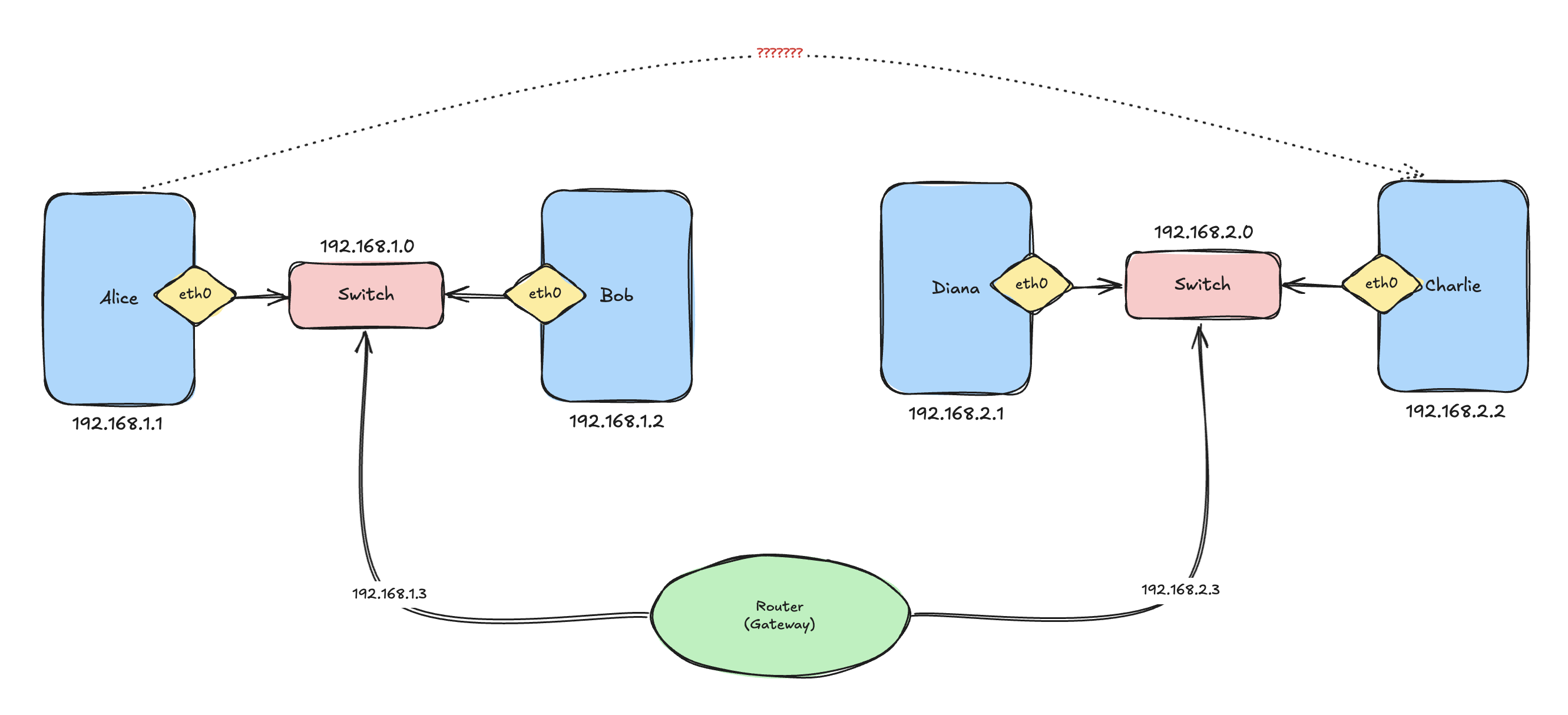
Imagine a router connected to: 192.168.1.0/24 and 192.168.2.0/24
Now Alice can add a route:
ip route add 192.168.2.0/24 via 192.168.1.3 dev eth0Now Alice’s routing table looks like:
default via 192.168.1.3 dev eth0
192.168.1.0/24 dev eth0 proto kernel scope link src 192.168.1.1
192.168.2.0/24 via 192.168.1.3 dev eth0
This basically means:
If you want to reach
192.168.2.x, send packets to192.168.1.3first and let THAT machine handle it.
On Charlie’s side, we do the reverse:
ip route add 192.168.1.0/24 via 192.168.2.3 dev eth0I think routing tables started making sense a bit now.
Okay Cool… But What About the Internet?
At this point, I was wondering: How does my machine know how to reach the entire internet literally?
Surely we are not adding routes for every public IP on earth, and it turns out… we are not 😄
This is where the default gateway comes in. The default route is basically the “catch-all” rule.
It means:
If I don’t know where something is, send it to that machine and let it figure it out.
On Alice:
ip route add default via 192.168.1.3 dev eth0Now the routing table becomes:
default via 192.168.1.3 dev eth0
192.168.1.0/24 dev eth0 proto kernel scope link src 192.168.1.1
192.168.2.0/24 via 192.168.1.3 dev eth0
A side note I also learned: Linux always performs routing using the longest prefix match.
So:
/24routes are more specific than/16/16routes are more specific than the default route (/0)
When Alice tries to reach 8.8.8.8, Linux checks:
192.168.1.0/24
192.168.2.0/24
default
Since 8.8.8.8 matches neither local route, Linux falls back to default via 192.168.1.3
which basically means:
I don’t know where the internet is, but my router probably does.
This was also the point where Kubernetes networking started feeling slightly less magical. Because Kubernetes is basically doing the same things, just with way more abstraction on top.
One Important Detail
There was still one thing confusing me.
So far we’ve been talking as if devices connect to networks, but that’s not actually true. Interfaces connect to networks. This distinction became SUPER important later when I started learning how containers work.
Imagine this setup:
- Alice connected through
eth0 - Bob connected through
eth1 - Eve sitting in the middle
Eve could receive traffic on eth0 and forward it through eth1. That is basically routing.
Interestingly, Linux does not allow forwarding traffic between interfaces by default so you need to explicitly enable IP forwarding:
sudo sysctl -w net.ipv4.ip_forward=1This turns a Linux machine into a router, and yes… Kubernetes nodes do exactly this.
This Is Where My Brain Started Melting 🔥
We’ve all heard the term “network namespaces,” or at least I had, but I never truly understood what they were until I learned that Linux networking engineers were absolutely cooking here 😂
A network namespace creates an isolated networking stack, where each namespace gets its own:
- interfaces
- routing table
- ARP table
- firewall rules
This is one of the foundational primitives behind containers.
To list namespaces:
ip netnsOn my machine, I see:
cni-34ee79ad-7eab-982e-5f03-ffcab5e1d9e3
cni-b5398207-2881-f1ab-015e-8c38c4b36e3e
These belong to Cilium. I’ll ignore them for now and create two namespaces:
ip netns add alice
ip netns add bob
Now:
ip netnsshows:
alice
bob
To execute commands inside a namespace:
ip netns exec <namespace> <command>For example:
ip netns exec alice ip linkreturns:
1: lo: <LOOPBACK> mtu 65536 qdisc noop state DOWN mode DEFAULT group default qlen 1000A fresh namespace only has a loopback interface, and it has no routes and no ARP entries.
Connecting Namespaces Together
Now comes the fun part 😎
We need something that behaves like a virtual cable.
Linux provides this using a veth pair. A veth pair is basically two virtual Ethernet interfaces connected back-to-back so whatever enters one side exits the other side.
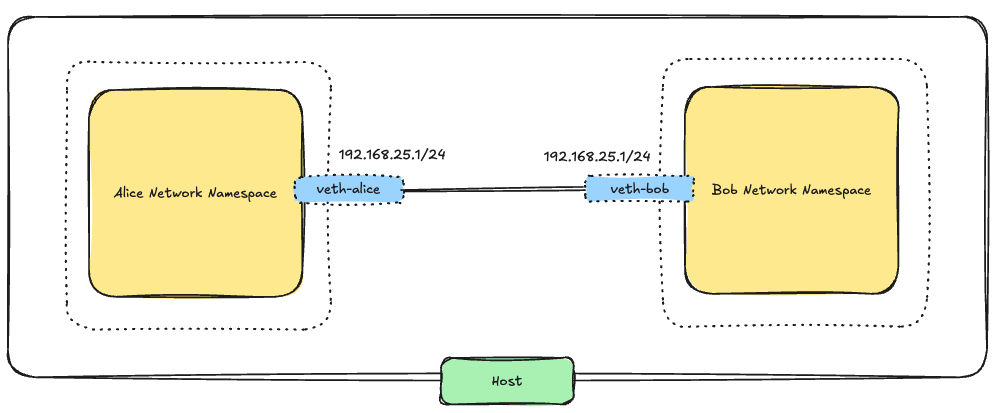
We create one like this:
ip link add veth-alice type veth peer name veth-bobNow Linux creates: veth-alice and veth-bob
Next we move each side into a namespace:
ip link set veth-alice netns alice
ip link set veth-bob netns bob
Now each namespace owns one side of the virtual cable.
Assign IPs:
ip netns exec alice ip addr add 192.168.25.1/24 dev veth-alice
ip netns exec bob ip addr add 192.168.25.2/24 dev veth-bob
Bring interfaces up:
ip netns exec alice ip link set veth-alice up
ip netns exec bob ip link set veth-bob up
Now let’s test:
ip netns exec alice ping 192.168.25.2And magically:
64 bytes from 192.168.25.2works 😎
Not gonna lie. At this point, I felt like a networking wizard 😄
The coolest part? The host network namespace does not have a route or interface for this network. The communication is happening entirely between isolated networking stacks connected through a virtual Ethernet cable.
Linux Bridges
The direct veth setup works great for two namespaces, but it clearly does not scale.
If we had 20 namespaces, manually connecting every pair would become ridiculous.
What we actually need is a virtual switch and that is exactly what a Linux bridge is.
A Linux bridge behaves like a Layer 2 switch:
- it learns MAC addresses
- forward Ethernet frames
- and allows multiple interfaces to communicate on the same virtual network
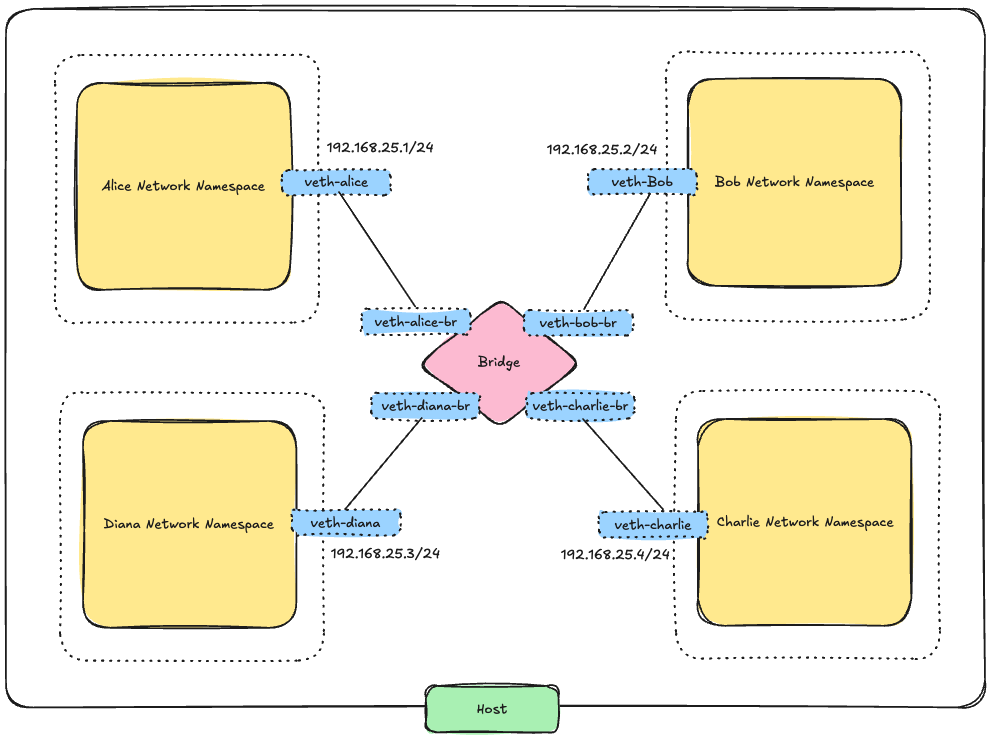
First, delete the old direct link:
ip -n alice link del veth-aliceDeleting one side automatically deletes the pair.
Now create a bridge on the host:
ip link add v-br-0 type bridge
ip link set v-br-0 up
Now create two new veth pairs:
ip link add veth-alice type veth peer name veth-alice-br
ip link add veth-bob type veth peer name veth-bob-br
Move one side into each namespace:
ip link set veth-alice netns alice
ip link set veth-bob netns bob
Attach the host-side interfaces to the bridge:
ip link set veth-alice-br master v-br-0
ip link set veth-bob-br master v-br-0
Bring everything up:
ip link set veth-alice-br up
ip link set veth-bob-br up
ip netns exec alice ip link set veth-alice up
ip netns exec bob ip link set veth-bob up
Assign IPs again:
ip netns exec alice ip addr add 192.168.25.1/24 dev veth-alice
ip netns exec bob ip addr add 192.168.25.2/24 dev veth-bob
Now Alice can ping Bob again:
ip netns exec alice ping 192.168.25.2The mental model for me became much cleaner:
- namespaces behave like isolated hosts
vethpairs behave like cables- bridges behave like switches
This is basically a tiny virtual network running entirely inside Linux.
Giving the Namespaces Internet Access
At this point, the namespaces could communicate with each other but they still could not reach the outside world.
We learned how to do this above so to fix this:
- Add the host to the bridge network
- Configure the namespaces to use the host as their default gateway
- Enable forwarding and NAT on the host
Assign an IP to the bridge:
ip addr add 192.168.25.5/24 dev v-br-0Now the host can reach the namespaces.
Inside each namespace:
ip netns exec alice ip route add default via 192.168.25.5
ip netns exec bob ip route add default via 192.168.25.5
Enable forwarding:
sudo sysctl -w net.ipv4.ip_forward=1Add NAT:
sudo iptables -t nat -A POSTROUTING -s 192.168.25.0/24 -o eth0 -j MASQUERADEI still don’t fully understand NAT internally, but conceptually it now makes sense: The host rewrites packets so traffic from the namespaces appears to come from the host itself.
Now this works:
ip netns exec alice ping 8.8.8.8This was one of the coolest learning moments I’ve had in a long time, because this is where container networking stopped being so magical to me.
So THAT’S What Docker Was Doing
Docker supports multiple networking modes:
none→ no network connectivityhost→ container shares the host network namespacebridge→ container connects to a private bridge network
The default Docker network is a bridge network.
You can inspect it with docker network ls, which usually shows:
NETWORK ID     NAME      DRIVER    SCOPE
bridge         bridge    bridge    local
host           host      local
none           null      local
On the host, Docker creates a bridge interface called docker0 with a subnet similar to 172.17.0.0/16, and the bridge itself usually gets: 172.17.0.1
Conceptually, Docker is doing almost exactly what we manually built above:
- Each container gets its own network namespace
- Each container gets its own interfaces and routing table
- Docker creates a
vethpair - One side goes into the container namespace
- The other side connects to
docker0 - Docker assigns IP addresses
- Docker configures routes
- Docker enables NAT so containers can access the internet
I finally felt like I had enough mental models to start understanding Kubernetes networking.
Hopefully my brain survives 😄
Kubernetes CNI
Okay, what do we have so far?
- Namespaces
- Veth pairs
- Bridges
- Routes
- NAT
Easy 😒
The question now is: who is actually creating all of this stuff inside Kubernetes?
Because in Kubernetes:
- Pods somehow get IPs
- Pods on different nodes magically talk to each other
- Traffic somehow flows across the cluster
- And I really hope none of my teammates is secretly creating bridges and
vethpairs by hand behind the scenes
Something clearly had to automate this entire dance.
And this is where CNIs enter the story.
Kubernetes did not want to hardcode networking into the platform itself because different companies wanted different networking models:
- overlays
- BGP routing
- eBPF
- policy engines
- encryption
- and many more things my brain still refuses to understand fully
So Kubernetes basically said:
We don’t care HOW networking is implemented, we just need a standard way to ask someone else to configure it.
That standard became what is known as Container Network Interface (CNI)
Tools that implement the CNI specification are called plugins, and “plugin” is just a fancy way of saying: executable programs responsible for configuring networking.
When a pod is created, Kubernetes effectively says something like:
Hey networking plugin, here is a network namespace. Please connect it to the cluster network.
Then the plugin:
- creates
vethpairs - configures routes
- assigns IPs
- attaches interfaces
- maybe configures overlays
- maybe installs eBPF programs
- and many other networking tricks
Some common CNIs are:
- the
bridgeplugin - Calico
- Cilium
- Flannel
The basic bridge plugin behaves very similarly to the networking setup we manually built earlier with Alice and friends. It creates a Linux bridge and connects containers locally on the same node.
More advanced CNIs like Calico and Cilium go much further and implement things like:
- distributed networking
- multi-node routing
- network policies
- encryption
- load balancing
- eBPF datapaths
- and observability
CRI is Another Important Piece
Kubernetes also needed a standard way to manage containers themselves. This is where another interface appears: the Container Runtime Interface (CRI).
CRI defines how Kubernetes communicates with container runtimes like containerd and CRI-O. Things like:
- creating containers
- starting/stopping containers
- pulling images
- listing containers
- managing sandboxes
- and many other runtime operations
are all exposed through the CRI.
Conceptually, the flow looks something like this: kubelet → CRI runtime → CNI plugin
The kubelet talks to the container runtime through the CRI, then the runtime invokes the configured CNI plugin and passes information such as:
- the container network namespace
- container ID
- interface name
- network configuration
Then the CNI plugin configures networking inside that namespace.
This layering actually makes a lot of sense when you step back and look at it.
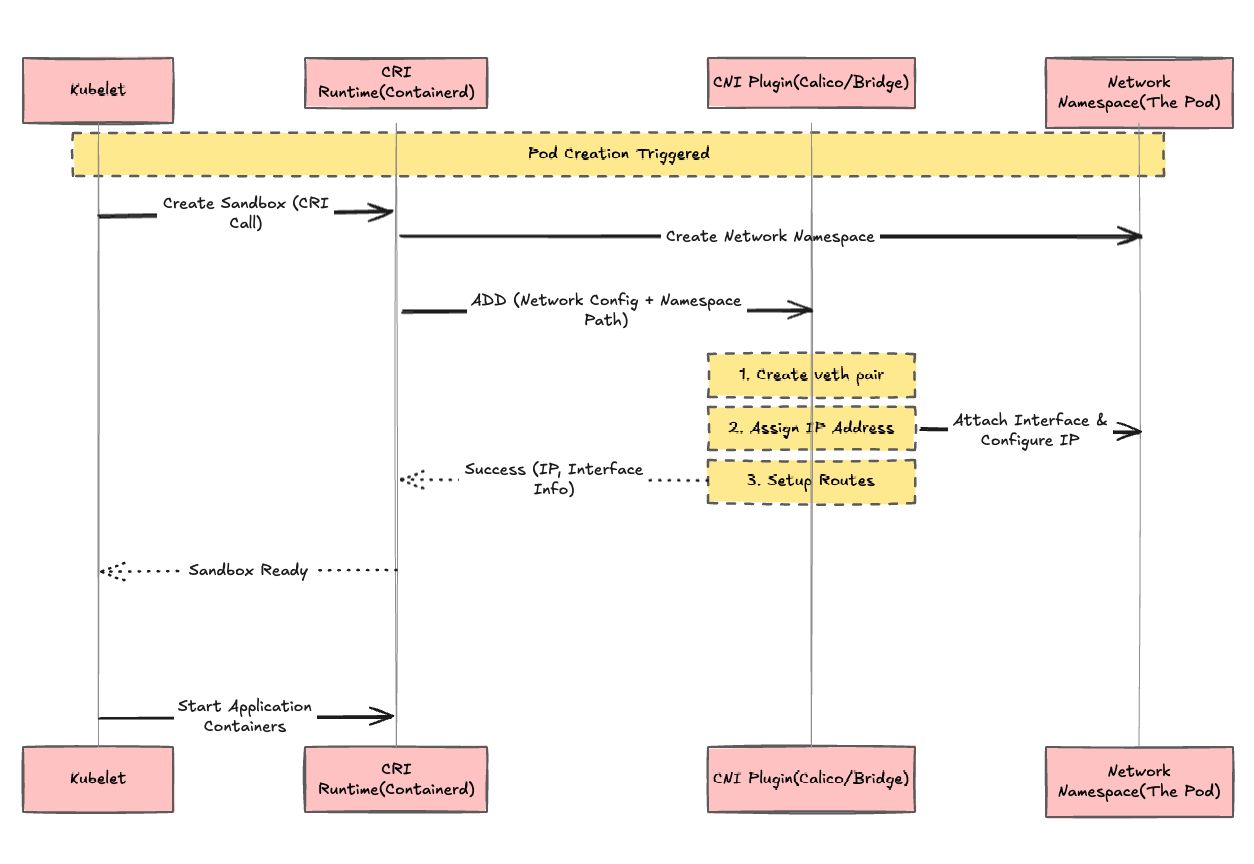
I mean… don’t get me wrong. This is still an absurd amount of complexity stacked on top of more complexity 😂
At this point, your brain is probably as fried as mine was, but surprisingly, all the pieces fit together pretty cleanly.
Wait… can Docker itself be used as a CNI plugin?
Turns out: not really. Docker does not natively implement CNI but Instead, Docker historically used its own networking model called the Container Network Model (CNM).
That said, containers can be created without networking first, and then later connected to networks using CNI plugins. This is useful as a mental model or experiment, but it is not how modern Kubernetes normally runs Docker, especially after the dockershim removal.
Which means conceptually, this still works. You can create the container using Docker and then run a plugin against it, providing the container ID and the network namespace.
Anyway… My Brain Is Cooked
Sorry dear readers, but I have to stop at this corner of hell for now.
There is still a LOT left to unpack and explore:
kube-proxy- Kubernetes Services
- the whole Pod-to-Pod communication dance
- overlay networks
- and many more things hiding inside the networking abyss
But honestly, I already feel like I finally have a solid mental model for how container networking is established underneath all the Kubernetes magic.
Thanks for reading and sorry again for frying your brain alongside mine (actually… I’m not that sorry 😈)